Pages

22 March 2012

Coming full circle

In this post I want to show a few of the upcoming features in specs2-1.9 and also take a step back on how specs2 features and implementation unfolded since I started the project one year ago.

Why would you want to rewrite from scratch?

Good question, that seems to be very masochistic :-). Not only because of the sheer amount of features to re-implement but more importantly because of the difficulty to move users to a new version.

I explained in details the reasons why I thought the rewrite was necessary, how it would benefit users and how to migrate in a previous blog post. What I want to emphasize here is the compromise I decided to make at that time:

  • more concurrency and reliability
  • less practicality

The main reason for this compromise was immutability. Forcing myself to immutability had opened the gates of robust and concurrent software but at the same time I had to cut back on the syntax I had proposed for the original specs1 project. For example it wasn't possible anymore to write:

    // this example can only be "registered" if there are side-effects
    "hello must have 5 letters" in {
      "hello" must have size(5)
    }
    "world must have 5 letters" in {
      "world" must have size(5)
    }

Instead, I proposed to write:

    // examples are "linked" together with the ^ operator
    "hello must have 5 letters" ! e1 ^
    "world must have 5 letters" ! e2

    def e1 = "hello" must have size(5)
    def e2 = "world" must have size(5)

The feed-back was immediate. Some developers who were sent a preview liked it but others told me: "NEVER I would use this horrible syntax". Ok, fair enough, I can't blame you, it's a bit ugly on the right.

I decided then that I would relax my constraints a little bit and add one, just one, var. It would only be used to accumulate examples when building the specification, to enable the good old specs1 style. This was also, at least partially, solving the migration problem since a full rewrite of the specifications was not necessary.

Not everything was as cool as in the original specs1 tough. In particular the super-easy "isolated" execution model was missing. Until...

Lightbulb

... Until it struck me, just one month ago, that reintroducing this mode of execution was less than 10 lines of code!

Because I had chosen the functional paradigm of "executing a Specification" <=> "interpreting a data structure" it was really easy to change the interpretation to something declaring: "for each example, execute the code in a clone of the Specification so that all local variables are seen as fresh variables".

In terms of product management, it was a "magic" feature almost for free! To me, this is the illustration of a principle of Software: "if code is a liability, maximise your return on investment".

Maximize the ROI

I'm sure you've already read something like: "features are an asset, code is a liability". But I haven't yet read the logical consequence of it: "Maximize the ROI: extract as many features as you can from your existing code". Indeed every time we write a piece of code, it's worth wondering:

  • how can this be put to a better use?
  • can I add something slightly different to provide a new useful feature?
  • can I generalize it a bit to make sense of it in another context?
  • can I make it composable with an existing feature to get a new one?

That's exactly what happened with the "isolated" feature above. Here's another example of this principle in action.

IO and serialization are not cheap

A few months ago, I developed a feature to create an index page. On this index page I had to show the status of specifications which had been executed as part of the previous run. This meant that I had to store somewhere, on the file system, the results of each specification execution.

In terms of feature price, this is not a particularly cheap one. Everytime there is some IO interaction and some kind of serialization, the number of possible issues to consider is not so small. In a way that was really an "iceberg" feature: not a lot of functionality on the surface, but a lot of machinery under the water. So I wondered how I could improve my ROI on this. Hmm... since I'm writing status information to the disk there might be a way to reuse it!

Indeed, I can use this information to selectively re-run only the failed examples, or the skipped ones, or... And so on. From there, a new "feature space" opens, and the initial investment starts making sense.

It is also possible to maximize the ROI on existing features. A feature is an "asset". Perhaps, but it's not completely free either. You have to explain it, to promote it, to show when and how it interacts with the rest of the software. This is why maximizing the ROI of features makes sense as well.

That's exactly what happened with the brand-new "isolated" feature.

All expectations

Year after year I'm looking at the specifications that people are writing with specs/specs2. Kind of my hallway usability test for open-source libraries... I usually see several "styles" of specifications and one style is pretty frequent:

    "This is an example of building/getting/processing a datastructure" >> {
       // do stuff
       val data = processBigData

       // check expectations
       data must doThis
       data must haveThat
       data.parts must beLikeThis
       // and so on...
    }

In that style of specification, there is usually one action and lots of things to check. It is very unfortunate that most of the testing libraries out there will stop at the first failure. Because it really makes sense to collect all of them at once instead of having to execute the specification multiple times to get to all the issues.

Is there a way to "collect" all the failures in specs2-1.8.2? Not really. You can try use "or" with the expectations:

       (data must doThis) or
       (data must haveThat) or
       (data.parts must beLikeThis)

And that will collect all the failures up to the first success, and then it will stop executing the rest. Besides, the "or" syntax with all the parenthesis is not so nice.

After a while I realized that the only way to make this work was to use yet another mutable variable to silently register each result. But then I'd be back to the old specs1 problem. What about concurrency? How can I prevent each concurrent example to step on another example results?

Well, that's easy, I have the "isolated" feature now! Each example can run in its own copy of the specification and the mutable variable will only collect the results from that example safely. The result is a feature that's easy to implement but also easy to use because it's just a matter of mixing a trait to the specification!

Coming full circle

Can I go further with the same thinking? Why not?!

From the beginning of specs2, I liked the fact that the so-called "Acceptance specification" style allowed me to write a lot of text about what my system behavior and then annotate it with the actual code. The price to pay was all the symbols on the right of the screen which appeared utterly cryptic to some people (to say it nicely).

Then, last week, I realized that I could rely on something which exists in most code editors: code folding! In a classical JUnit TestCase, specs1 specification or specs2 mutable specification if you fold the code, you're left with only the text, forming a narrative for your system. If you see it like that, any specs2 mutable specification can be turned into an acceptance specification, just a few features are missing:

Not a lot to implement really. Most of the machinery is already provided by the org.specs2.Specification trait. This means that, for a very reasonable "price", you can now use "mutable" specifications in specs2 with a great deal of expressivity (nothing's perfect though, there are small issues due to semi-column inference for example, see here for variations around the "Stack" theme).

Full circle and blurred lines

To me, it really feels that I've come full circle:

  1. I rebuilt from scratch the "Specification" concept from specs1, throwing away the syntax
  2. I reintroduced some mutability very carefully to get some of that syntax back
  3. I built upon all the immutable code to finally end up with exactly what I would have liked to have in specs1!

My only concern now is that newcomers might feel lost because the library is not really prescribing a specific style: "should I use a 'unit' style or an 'acceptance' style? And what are the differences between the 2 anyway?". I hope that they'll realize that this is actually an opportunity. An opportunity to try out different ways of communicating and then choosing the most efficient or pleasing.

09 December 2011

Pragmatic IO - part 3

A follow-up to my previous posts about IO.

Why types and laws matter

It's embarrassing to write post after post only to find out I keep being wrong :-). While the technique I described in my last post (using StreamT) works ok, I actually don't have to use it. The traverse technique explained in EIP works perfectly, provided that:

  • we write a proper Traverse instance using foldLeft (as explained in the first part of this post)

  • we trampoline the State to avoid Stack overflows due to a long chain of flatMaps during the traversal

  • we use the right types!

Get the types right

That's the point I want to insist on today. Last evening I read the revisited WordCount example in Scalaz-seven which is like the canonical example of using the EIP ideas. Two words in the comments struck my mind: "compose" and "fuse". Indeed, one very important thing about EIP is the ability to compose Applicatives so that their actions should "fuse" during a traversal. As if they were executed in the same "for" loop!

So, when I wrote in my previous post that I needed to traverse the stream of lines several times to get the results, something had to be wrong somewhere. The types were wrong!

  1. instead of traversing with State[S, *] where * =:= IO[B], I should traverse with State[S, IO[*]]
  2. what I get back is a State[S, IO[Seq[B]]], instead of a State[S, Seq[IO[B]]
  3. this matters because passing in an initial state then returns IO[Seq[B]] instead of Seq[IO[B]]

Exactly what I want, without having to sequence anything.

Use the laws

Not only I get what I want, but also it is conceptually right as the result of an important traverse law:

  traverse(f compose g) == traverse(f) compose traverse(g)

That "fusion" law guarantees that composing 2 effects can be fused, and executed in only one traversal. It's worth instantiating f and g to make that more concrete:

  // what to do with the line and line number
  def importLine(i: Int, l: String): (Int, IO[Unit]) =
    (i, storeLine(l) >>= println("imported line "+i))

  // `g` keeps track of the line number
  val g : String => State[Int, String] =
    (s: String) => state((i: Int) => (i+1, s))

  // `f` takes the current line/line number and do the import/reporting
  val f : State[Int, String] => State[Int, IO[Unit]] =
    st => state((i: Int) => importLine(st(i)))

  // `f compose g` fuses both actions
  val f_g: String => State[Int, IO[Unit]] = f compose g

I'm really glad that I was able to converge on established principles. Why couldn't I see this earlier?

Scala and Scalaz-seven might help

In retrospect, I remember what led me astray. When I realized that I had to use a State transformer with a Trampoline, I just got scared by the Applicative instance I had to provide. Its type is:

  /**
   * Here we want M1 to `Trampoline` and M2 to be `IO`
   */
  implicit def StateTMApplicative[M1[_]: Monad, S, M2[_] : Applicative] =
    Applicative.applicative[({type l[a] = StateT[M1, S, M2[a]]})#l]

I also need some Pure and Apply instances in scope:

  implicit def StateTMApply[M1[_]: Monad, S, M2[_] : Applicative] =
    new Apply[({type l[a]=StateT[M1, S, M2[a]]})#l] {
      def apply[A, B](f: StateT[M1, S, M2[A => B]], a: StateT[M1, S, M2[A]]) =
        f.flatMap(ff => a.map(aa => aa <*> ff))
    }

  implicit def StateTMPure[M1[_] : Pure, S, M2[_] : Pure] =
    new Pure[({type l[a]=StateT[M1, S, M2[a]]})#l] {
      def pure[A](a: => A) = stateT((s: S) => (s, a.pure[M2]).pure[M1])
    }

Once it's written, it may not seem so hard but I got very confused trying to get there. How can it be made easier? First, we could have better type annotations for partial type application, like:

  // notice the * instead of the "type l" trick
  implicit def StateTMApplicative[M1[_]: Monad, S, M2[_] : Applicative] =
    Applicative.applicative[StateT[M1, S, M2[*]]]

  implicit def StateTMApply[M1[_]: Monad, S, M2[_] : Applicative] =
    new Apply[StateT[M1, S, M2[*]]] {
      def apply[A, B](f: StateT[M1, S, M2[A => B]], a: StateT[M1, S, M2[A]]) =
        f.flatMap(ff => a.map(aa => aa <*> ff))
    }

  implicit def StateTMPure[M1[_] : Pure, S, M2[_] : Pure] =
    new Pure[StateT[M1, S, M2[*]]] {
      def pure[A](a: => A) = stateT((s: S) => (s, a.pure[M2]).pure[M1])
    }

And with a better type inference, the first definition could be even be (we can always dream :-)):

  implicit def StateTMApplicative[M1[_]: Monad, S, M2[_] : Applicative]:
    Applicative[StateT[M1, S, M2[*]]] = Applicative.applicative

Which means that it may even be removed, just import Applicative.applicative!

Actually Scalaz-seven might help by:

  • providing those instances out-of-the box

  • even better, provide combinators to create those instances easily. That's what the compose method does

  • give even better type inference. Look at the traverseU method here, no type annotations Ma!

Now that the fundamentals are working ok for my application, I can go back to adding features, yay!

08 December 2011

Pragmatic IO - part 2

A follow-up to my previous post about IO.

Learning by being wrong, very wrong

I didn't think that diving into the functional IO world would have me think so hard about how to use some FP concepts.

Mind the law

The technique I described at the end of my previous post didn't really work. It was wrong on many accounts. First of all, my
Traverse instance was buggy because I was reversing the traversed Stream. This is why I had inverted messages in the console. During the traversal, starting from the left, I needed to append each traversed element to the result, not prepend it:

  /**
   * WRONG: because each new element `b` must be appended to the result.
   * it should be bs :+ b instead
   */
  def SeqLeftTraverse: Traverse[Seq] = new Traverse[Seq] {
    def traverse[F[_]: Applicative, A, B](f: A => F[B], as: Seq[A]): F[Seq[B]] =
      as.foldl[F[Seq[B]]](Seq[B]().pure) { (ys, x) =>
        implicitly[Apply[F]].apply(f(x) map ((b: B) => (bs: Seq[B]) => b +: bs), ys)
      }
  }

It is important to mention here that proper testing should have caught this. There are some laws that applicative traversals must satisfy (see EIP, section 5. One of them is that seq.traverse(identity) == seq. This is obviously not the case when I returned a reverted sequence.

Not at the right time

Then I realized something also which was also worrying. On big files, my application would do a lot, then, report its activity to the console. This would definitely not have happened in a simple for loop with unrestricted effects!

So I set out to find a better implementation for my file reading / records saving. The solution I'm going to present here is just one way of doing it, given my way of constraining the problem. There are others, specifically the use of Iteratees.

My goal

This is what I want to do: I want to read lines from a file, transform them into "records" and store them in a database. Along the way, I want to inform the user of the progress of the task, based on the number of lines already imported.

More precisely, I want 2 classes with the following interfaces:

  • the Source class is capable of reading lines and do something on each line, possibly based on some state, like the number of lines already read.
    The Source class should also be responsible for closing all the opened resources whether things go wrong or not

  • the Extractor class should provide a function declaring what to do with the current line and state. Ideally it should be possible to create that function by composing independent actions: storing records in the db and / or printing messages on the console

  • and, by the way, I don't want this to go out-of-memory or stack overflow at run-time just because I'm importing a big file :-)

Mind you, it took me quite a while to arrive there. In retrospect, I could have noticed that:

  • all the processing has to take place inside the Source.readLines method. Otherwise there's no way to close the resources properly (well unless you're using Iteratees, what Paul Chiusano refers to as "Consumer" processing)

  • the signature of the function passed to Source.readLines has to be String => State[IO[A]], meaning that for each line, we're doing an IO action (like saving it to the database) but based on a State

  • the end result of readLines has to be IO[Seq[A]] which is an action returning the sequence of all the return values when all the IO actions have been performed

Considering all that, I ended up with the following signatures:

  /**
   * @param  filePath the file to read from
   * @f      a function doing an IO action for each line, based on a State
   * @init   the initial value of the State
   * @return an IO action reading all the lines and returning the sequence of computed values
   */
   def readLinesIO[S, A](filePath: String)(f: String => State[S, IO[A]])(init: S): IO[Seq[A]]

and the Extractor code goes:

  // the initial state
  val counter = new LogarithmicCounter(level = 100, scale = 10)

  // a function to notify the user when we've reached a given level
  val onLevel            = (i: Int) => printTime("imported from "+filePath+": "+i+" lines")
  // a function to create and store each line
  def onCount(l: String) = (i: Int) => createAndStoreRecord(Line(file, l), creator)

  // for each line, apply the actions described as a State[LogarithmicCounter, IO[A]] object
  readLinesIO(file.getPath)(l => counter.asState(onLevel, onCount(l)))(counter)

I like that interface because it keeps things separated and generic enough:

  • reading the lines and opening/closing the resources goes to one class: Source
  • defining how the state evolves when an action is done goes to the LogarithmicCounter class
  • defining what to do exactly with each line goes in one class, the Extractor class

Now, the tricky implementation question is: how do you implement readLinesIO?

What not to do

Definitely the wrong way to do it is to use a "regular" traverse on the stream of input lines. Even with the trampolining trick described in my previous post.

Indeed traverse is going to fold everything once to go from Stream[String] to State[S, Seq[IO[B]]] then, with the initial State value, to Seq[IO[B]] which then has to be sequenced into IO[Seq[B]]. This is guaranteed to do more work than necessary. More than what a single for loop would do.

The other thing not to do is so silly that I'm ashamed to write it here. Ok, I'll write it. At least to avoid someone else the same idea. I had an implicit conversion from A to IO[A],...

That's a very tempting thing to do and very convenient at first glance. Whenever a function was expecting an IO[A], I could just pass a without having to write a.pure[IO]. The trouble is, some actions were never executed! I don't have a specific example to show, but I'm pretty sure that, at some point, I had values of type IO[IO[A]]. In that case, doing unsafePerformIO, i.e. "executing" the IO action only returns another action to execute and doesn't do anything really!

Learn your FP classes

I must admit I've been reluctant to go into what was advised on the Scalaz mailing-list: "go with StreamT", "use Iteratees". Really? I just want to do IO! Can I learn all that stuff later? I finally decided to go with the first option and describe it here in detail.

StreamT is a "Stream transformer". It is the Scala version of the ListT done right in Haskell. That looks a bit scary at first but it is not so hard. It is an infinite list of elements which are not values but computations. So it more or less has the type Seq[M[A]] where M is some kind of effect, like changing a State or doing IO.

My first practical question was: "how do I even build that thing from a Stream of elements?"

Unfolding a data structure

Unfolding is the way. In the Scala world we are used to "folding" data structures into elements: get the sum of the elements of a list, get the maximum element in a tree. We less often do the opposite: generate a data structure from one element and a function. One example of this is generating the list of Fibonacci numbers out of an initial pair (0, 1) and a function computing the next "Fibonacci step".

With the StreamT class in Scalaz, you do this:

  /** our record-creation function */
  def f[B]: String => M[B]

  /**
   * unfolding the initial Stream to a StreamT where we apply
   * a `State` function `f` to each element
   */
  StreamT.unfoldM[M, B, Seq[A]](seq: Seq[A]) { (ss: Seq[A]) =>
    if (ss.isEmpty)  (None: Option[(B, Seq[A])]).pure[M]
    else              f(ss.head).map((b: B) => Some((b, ss.tail)))
  }

The code above takes an initial sequence seq (the Stream of lines to read) and:

  • if there are no more elements, you return None.pure[M], there's nothing left to do. In my specific use case that'll be State[LogarithmicCounter, None]

  • if there is an element in the Stream, f is applied to that element, that is, we create a record from the line and store it in the database (that's the b:B parameter, which is going to be an IO action)

  • because M is the State monad, when we apply f, this also computes the next state to keep track of how many rows we've imported so far

  • then the rest of the stream of lines to process, ss.tail, is also returned and unfoldM will use that to compute the next "unfolding" step

One very important thing to notice here is that we haven't consumed any element at that stage. We've only declared what we plan to do with each element of the input stream.

Running the StreamT

In the StreamT object in Scalaz there is this method call runStreamT taking in:

  • a StreamT[State[S, *], A], so that's a StreamT where the state may change with each element of the Stream
  • an initial state s0
  • and returning a StreamT[Id, A]

Note: State[S, *] is a non-existing notation for ({type l[a]=State[S, a]})#l

That doesn't see to be game-changing, but this does a useful thing for us. runStreamT "threads" the State through all elements, starting with the initial value. In our case that means that we're going to create IO actions, where each created action depends on the current state (the number of lines read so far).

The cool thing is that so far we've described transformations to apply: Stream[String] to StreamT[State, IO[B]] to StreamT[Id, IO[B]] but we still haven't executed anything!

UnsafePerformIO at last

Then, I coded an unsafePerformIO method specialized for Stream[Id, IO[A]] to execute all the IO actions. The method itself is not difficult to write but we need to make sure it's tail-recursive:

  /** execute all the IO actions on a StreamT when it only contains IO actions */
  def unsafePerformIO: Seq[A] = toSeq(streamT, Seq[A]())

  /**
   * execute a StreamT containing `IO` actions.
   *
   * Each IO action is executed and the result goes into a list of results
   */
  @tailrec
  private def toSeq[A](streamT: StreamT[Id, IO[A]], result: Seq[A]): Seq[A] =
    streamT.uncons match {
      case Some((head, tail)) => toSeq(tail, result :+ head.unsafePerformIO)
      case None               => result
    }
Hidding everything under the rug

Let's assemble the pieces of the puzzle now. With an implicit conversion, it is possible to transform any Seq to a StreamT performing some action on its elements:

   /**
    * for this to work, M[_] has to be a "PointedFunctor", i.e. have "pure" and
    * "fmap" methods. It is implemented using the `unfoldM` method code seen above
    */
   seq.toStreamT(f: A => M[B]): StreamT[M, B]

Then, we can traverse a whole sequence with a composition of a State and IO actions:

   seq.traverseStateIO(f)

Where traverseStateIO is using the toStreamT transformation and is defined as:

  /**
   * traverse a stream with a State and IO actions by using a Stream transformer
   */
  def traverseStateIO[S, B](f: A => State[S, IO[B]])(init: S): Seq[B] =
    StreamT.runStreamT(seq.toStreamT[State[S, *], IO[B]](f), init).unsafePerformIO

[you'll get bonus points for anyone providing a Traverse[Stream] instance based on StreamT - if that exists]

Finally the Source.readLines method is implemented as:

  /**
   * this method reads the lines of a file and apply stateful actions.
   * @return an IO action doing all the reading and return a value for each processed line
   */
  def readLinesIO[S, A](path: String)(f: String => State[S, IO[A]])(init: S): IO[Seq[A]] =
    readLines(path)(f)(init).pure[IO]

  private
  def readLines[S, A](path: String)(f: String => State[S, IO[A]])(init: S): Seq[A] = {
    // store the opened resource
    var source: Option[scala.io.Source] = None
    def getSourceLines(src: scala.io.Source) = { source = Some(src); getLines(src) }

    try {
      // read the lines and execute the actions
      getSourceLines(fromFile(path)).toSeq.traverseStateIO(f)(init)
    } finally { sources.map(_.close()) }
  }

And the client code, the Extractor class does:

  val counter = new LogarithmicCounter(level = 100, scale = 10)

  // notify the user when we've reached a given level
  val onLevel            = (i: Int) => printTime("imported from "+filePath+": "+i+" lines")
  // create and store a record for each new line
  def onCount(l: String) = (i: Int) => createAndStoreRecord(Line(file, l), creator)

  // an `IO` action doing the extraction
  readLinesIO(file.getPath)(l => counter.asState(onLevel, onCount(l)))(counter)

Conclusion

I've had more than one WTF moment when trying to mix-in State, IO and resources management together. I've been very tempted to go back to vars and unrestricted effects :-).

Yet, I got to learn useful abstractions like StreamT and I've seen that it was indeed possible to define generic, composable and functional interfaces between components. I also got the impression that there lots of different situations where we are manually passing state around which is error-prone and which can be done generically by traverse-like methods.

05 December 2011

Pragmatic IO

This post is my exploration of the use of the IO type in a small Scala application.

A short IO introduction

Scala is a pragmatic language when you start learning Functional Programming (FP). Indeed there are some times when you can't apply the proper FP techniques just because you don't know them yet. In those cases you can still resort to variables and side-effects to your heart's content. One of these situations is IO (input/output).

Let's take an example: you need to save data in a database (not a rare thing :-)). The signature of your method will certainly look like that:

  /** @return the unique database id of the saved user */
  def save(user: User): Int

This method is not referentially transparent since it changes the state of the "outside world": if you call it twice, you'll get a different result. This kind of thing is very troubling for a Functional Programmer, that doesn't make him sleep well at night. And anyway, in a language like Haskell, where each function is pure you can't implement it. So how do you do?

The neat trick is to return an action saying "I'm going to save the user" instead of actually saving it:

  def save(user: User): IO[Int]

At first, it seems difficult to do anything from there because we just have an IO[Int], not a real Int. If we want to display the result on the screen, what do we do?

We use IO as a Monad, with the flatMap operation, to sequence the 2 actions, into a new one:

  /** create an IO action to print a line on the screen */
  def printLine(line: Any): IO[Unit] = println(line).pure[IO]

  /** save a user and print the new id on the screen */
                                           // or save(user) >>= printLine
  def saveAndPrint(user: User): IO[Unit] = save(user).flatMap(id => printLine(id))

Then finally when we want to execute the actions for real, we call unsafePerformIO in the main method:

  def main(args: Array[String]) {
    saveAndPrint(User("Eric")).unsafePerformIO
  }

That's more or less the Haskell way to do IO in Scala but nothing forces us to do so. The natural question which arises is: what should we do?

IO or not IO

Before starting this experiment, I fully re-read this thread on the Scala mailing-list, and the answer is not clear for many people apparently. Martin Odersky doesn't seemed convinced that this is the way to go. He thinks that there should be a more lightweight and polymorphic way to get effect checking and Bob Harper doesn't see the point.

Surely the best way to form my own judgement was to try it out by myself (as encouraged by Runar). One thing I know for sure is that, the moment I started printing out files in specs2, I got an uneasy feeling that something could/would go wrong. Since then,
IO has been on my radar of things to try out.

Luckily, these days, I'm developing an application which is just the perfect candidate for that. This application:

  • reads log files
  • stores the records in a MongoDB database
  • creates graphs to analyze the data (maximums, average, distribution of some variables)

Perfect but,... where do I start :-)?

Theory => Practice

That was indeed my first question. Even in a small Swing application like mine the effects were interleaved in many places:

  • when I opened the MongoDB connection, I was printing some messages on the application console to inform the user about the db name, the MongoDB version,...
  • the class responsible for creating the reports was fetching its own data, effectively doing IO
  • datastore queries are cached, and getting some records (an IO action) required to get other data (the date of the latest import, another IO action) to decide if we could reuse the cached ones instead

The other obvious question was: "where do I call unsafePerformIO?". This in an interactive application, I can't put just one
unsafePerformIO in the main method!

The last question was: "OMG, I started to put IO in a few places, now it's eating all of my application, what can I do?" :-))

Segregating the effects

Here's what I ended up doing. First of all let's draw a diagram of the main components of my application before refactoring:

   +-------+    extract/getReport       +------ IO +   store      +------ IO +
   + Gui   + <------------------------> + Process  + -----------> + Store    +
   +-------+     Query/LogReport        +----------+              +----------+
                                             | getReport               ^
                                             v                         |
                                        +------ IO +     getRecords    |
                                        + Reports  + ------------------+
                                        +----------+

Simple app, I told you.

The first issue was that the Reports class (actually a bit more than just one class) was fetching records and building reports at the same time. So if I decided to put IO types on the store I would drag them in any subsequent transformation (marked as IO on the diagram).

The next issue was that the Process class was also doing too much: reading files and storing records.

Those 2 things led me to this refactoring and "architectural" decision, IO annotations would only happen on the middle layer:

                                        +------- IO +            store
                               read     + Extractor + -----------------------------+
                               files    +-----------+          |                   |
                                             ^                 |                   |
                                             | extract         v                   v
   +-------+    extract/getReport       +----------+      +------ IO +        +----------+
   + Gui   + <------------------------> + Process  +      + Status   +        + Store    +
   +-------+     Query/LogReport        +----------+      +----------+        +----------+
                                             | getReport       ^                   ^
                                             v                 |                   |
                                        +------ IO +           |    getRecords     |
                                        + Reporter + ------------------------------+
                                        +----------+
                                             | createReport
                                             v
                                        +----------+
                                        + Reports  +
                                        +----------+
  • all the IO actions are being segregrated to special classes. For example extracting lines for log files creates a big composite IO action to read the lines, to store the lines as a record and to report the status of the extraction. This is handled by the Extractor class

  • the Status class handles all the printing on the the console. It provides methods like:

      /**
       * print a message with a timestamp, execute an action,
       * and print an end message with a timestamp also.
       *
       * This method used by the `Extractor`, `Reporter` and `Process` classes.
       */
       def statusIO[T](before: String, action: IO[T], after: String): IO[T]`
    
  • the Reports class only deals with the aggregation of data from records coming from the Store. However it is completely ignorant of this fact, so testing becomes easier (true story, that really helped!)

  • the Store does not have any IO type. In that sense my approach is not very pure, since nothing prevents "someone" from directly calling the store from the middle layer without encapsulating the call in an IO action. I might argue that this is pragmatic. Instead of sprinkling IO everywhere I started by defining a layer isolating the IO world (the data store, the file system) from the non-IO world (the reports, the GUI. Then, if I want, I can extend the IO marking the rest of the application if I want to. That being said I didn't do it because I didn't really see the added-value at that stage. A name for this approach could be "gradual effecting" (the equivalent of "gradual typing")

  • the Process class is not marked as IO because all the methods provided by that class are actually calling
    unsafePerformIO to really execute the actions. This is the only place in the application where this kind of call occurs and the GUI layer could be left unchanged

All of that was not too hard, but was not a walk in the park either. Some details of the implementation were hard to come up with.

Under the bonnet: syntactic tricks

First of all, what was easy?

"Monadic" sequencing

Sequencing IO actions is indeed easy. I've used the for comprehension:

  def statusIO[T](before: String, action: IO[T], after: String): IO[T] = {
    for {
      _      <- printTime(before)
      result <- action
      _      <- printTime(after)
    } yield result
  }
"Semi-column" sequencing

But also the >>=| operator in Scalaz to just sequence 2 actions when you don't care about the first one:

  def statusIO[T](before: String)(action: IO[T]): IO[T] = printTime(before) >>=| action
"Conditional" sequencing

And, for the fun of it, I implemented a "conditional flatMap operator", >>=?:

  action1 >>=? (condition, action2)

In the code above the action1 is executed and, if the condition is true, we execute action2 and forget about the result of action1, otherwise we keep the result of action1.

"if else" with a twist

Not completely related to IO I also liked the ?? operator. Say I want to execute an action only if a file exists:

   if (file.exists) createRecords(file)
   else             ()

The else line really feels ugly. This kind of "default value" should be inferred from somewhere. Indeed! This "default value" is the Zero of a given type in Scalaz, so it is possible to write:

   file.exists ?? createRecords(file)

It just works (tm) but it's worth knowing where that zero values really comes from:

  1. createRecords(file) returns IO[Int] (the last created id - that's a simplification of the real program)

  2. there is a way to create a Monoid from another Monoid + an Applicative:

    // from scalaz.Monoid
    /** A monoid for sequencing Applicative effects. */
    def liftMonoid[F[_], M](implicit m: Monoid[M], a: Applicative[F]): Monoid[F[M]] =
      new Monoid[F[M]] {
        val zero: F[M] = a.pure(m.zero)
        def append(x: F[M], y: => F[M]): F[M] =
          a.liftA2(x, y, (m1: M, m2: M) => m.append(m1, m2))
      }
    
  3. in this case IO has an Applicative, M is Int so it has a Monoid hence IO[Int] defines a Monoid where the zero is IO(0). I had to open up the debugger to check that precisely :-)

Under the bonnet: it just works,... not

The next piece of implementation I was really happy with was the "logarithmic reporting". This is a feature I implemented using vars at first, which I wanted to make pure in my quest for IO.

What I want is to extract log lines and notify the user when a bunch of lines have been imported (so that he doesn't get too bored). But I don't know how many lines there are in a given file. It could be 100 but it could be 30.000 or 100.000. So I thought that a "logarithmic" counter would be nice. With that counter, I notify the user every 100, 1000, 10.000, 100.000 lines.

The LogarithmicCounter works by creating a State object encapsulating 2 actions to do, one on each tick, one when a
level is reached:

    // create and store a line on each `tick`
    def onCount(line: String) = (i: Int) => createAndStoreRecord(line, creator)

    // and notify the user when we've reached a given level
    val onLevel = (i: Int) => printTime("imported from "+filePath+": "+i+" lines")

    /** @return a State[LogarithmicCounter, IO[Unit]] */
    val readLine = (line: String) => counter.asState(onLevel, onCount(line))

The readLine method is used in a traversal of the lines returned by a FileReader:

    (lines traverseState readLine): State[LogarithmicCounter, Stream[IO[Unit]]]

Pass it an initial counter and you get back a Stream of IO actions which you can then sequence to get an IO[Stream[Unit]]:

    // initial traversal with a function returning a `State`
    val traversed: State[LogarithmicCounter, Stream[IO[Unit]]] = lines traverseState readLine

    // feed in the initial values: count = 1, level = 100 to get the end `State`
    val traversedEndState: Stream[IO[Unit]] = traversed ! new LogarithmicCounter

    // finally get a global action which will execute a stream of
    // record-storing actions and printing actions
    val toStore: IO[Stream[Unit]] = traversedEndState.sequence

Some readers of this blog may recognize one usage of the Essence of the Iterator Pattern - EIP and that's indeed what it is (my first real use case, yes!). traverseState is just a way to use the more traditional traverse method but hiding the ugly type annotations.

This kind of type-directed development is nice. You add some type here and there and you let the compiler guide you to which method to apply in order to get the desired results:

  1. after the traversal I get back a State
  2. if I want to get the final state, the Stream of IO, I need to feed in some initial values, that's the '!' method
  3. if I want to get an action equivalent to the stream of actions, I need the sequence method which has exactly the type signature doing what I want

I was about to call it a day when I actually tried my application,... StackOverflow! What?!?

Trampolining to the rescue

It turns out that traversing a "big" sequence with a State is not so easy. First of all, State is an Applicative because it is also a Monad (please read the earlier EIP post for the details). So basically this amounts to chaining a lot of flatMap operations which blows up the stack.

Fortunately for me, Runar has implemented a generic solution for this kind of issue, like, less than 2 months ago! I leave you to his excellent post for a detailed explanation but the gist of it is to use continuations to describe computations and store them on the heap instead of letting calls happen on the stack. So instead of using State[S, A] I use StateT[Trampoline, S, A] where each computation (S, A) returned by the State monad is actually encapsulated in a Trampoline to be executed on the heap.

The application of this idea was not too easy at first and Runar helped me with a code snippet (thanks!). Eventually I managed to keep everything well hidden behind the traverseState function. The first thing I did was to "trampoline" the function passed to traverseState:

  /**
   * transform a function into its "trampolined" version
   * val f:             T => State[S, A]              = (t: T) => State[S, A]
   * val f_trampolined: T => StateT[Trampoline, S, A] = f.trampolined
   */
  implicit def liftToTrampoline[T, S, A](f: T => State[S, A]) = new LiftToTrampoline(f)

  class LiftToTrampoline[T, S, A](f: T => State[S, A]) {
    def trampolined = (t: T) => stateT((s: S) => suspend(st.apply(s)))
  }

So the traverseState function definition becomes:

  // with the full ugly type annotation
  def traverseState(f: T => State[S, B]) =
    seq.traverse[({type l[a]=StateT[Trampoline, S, a]})#l, B](f.trampolined)

However I can't leave things that like that because traverseState then returns a StateT[Trampoline, S, B] when the client of the function expects a State[S, B]. So I added an untrampolined method to recover a State from a "trampolined" one:

  /** @return a normal State from a "trampolined" one */
  implicit def fromTrampoline[S, A](st: StateT[Trampoline, S, A]) = new FromTrampoline(st)

  class FromTrampoline[S, A](st: StateT[Trampoline, S, A]) {
    def untrampolined: State[S, A] = state((s: S) => st(s).run)
  }

The end result is not so bad. The "trampoline" trick is hidden as an implementation detail and I don't get StackOverflows anymore. Really? Not really,...

The subtleties of foldRight and foldLeft

I was still getting a StackOverflow error but not in the same place as before (#&$^@!!!). It was in the traversal function itself, not in the chaining of flatMaps. The reason for that one was that the Traverse instance for a Stream in Scalaz is using foldRight (or foldr):

  implicit def StreamTraverse: Traverse[Stream] = new Traverse[Stream] {
    def traverse[F[_]: Applicative, A, B](f: A => F[B], as: Stream[A]): F[Stream[B]] =
      as.foldr[F[Stream[B]]](Stream.empty.pure) { (x, ys) =>
        implicitly[Apply[F]].apply(f(x) map ((a: B) => (b: Stream[B]) => a #:: b), ys)
      }
  }

and foldr is recursively intensive. It basically says: foldRight(n) = f(n, foldRight(n-1)) whereas foldl is implemented with a for loop and a variable to accumulate the result.

The workaround for this situation is simple: just provide a Traverse instance using foldLeft. But then you can wonder: "why is traverse even using foldRight in the first place?". The answer is in my next bug! After doing the modifications above I didn't get a SOE anymore but the output in the console was like:

  imported from test.log: 10000 lines [12:33:30]
  imported from test.log: 1000 lines  [12:33:30]
  imported from test.log: 100 lines   [12:33:30]

Cool, I have invented a Time Machine, Marty! That one left me puzzled for a while but I found the solution if not the explanation. The "left-folding" Traverse instance I had left in scope was being used by the sequence method to transform a Stream[IO] into an IO[Stream]. Changing that to the standard "right-folding" behaviour for a Stream traversal was ok. So there is a difference (meaning that something is not associative somewhere,...)

Conclusion

The main conclusion from this experiment is that tagging methods with IO made me really think about where are the effects of my application. It also encouraged functional programming techniques such as traverse, sequence and al.

I must however say that I was surprised on more than one account:

  • I stumbled upon a whole new class of bugs: non-execution. My effects were not executed improperly, they were not executed at all because I forgot to call unsafePerformIO!

  • I was not expecting to be needing an optimisation which had just been added to Scalaz, for something which I thought was a casual traversal

  • there are still some FP mysteries to me. For example I don't know yet how to traverse a full Stream

  • I also don't get why my messages were inverted on the console. I tried different experiments, with a Seq instead of a Stream, with Identity or Option as an Applicative instead of IO and I could only reproduce this specific behavior with Stream and IO

Anyway, I would say that it was overall worth using the IO type, at least for the architectural clarification and the better testing. It also brought back the warm, fuzzy feeling that things are under control. On the other hand refactoring to IO took me longer than expected and required more knowledge than just using vars and regular I/O. But that should really be accounted for in the 'investment for the future' column.

PS

There are certainly many stones left unturned in that post for programmers new to Functional Programming and Scalaz. I do apologize for that (this post is certainly long enough :-)) and I encourage those readers to ask questions on the Scalaz mailing-list.

11 November 2011

Practical uses for Unboxed Tagged Types

Another blog post to show that the esoteric type system tricks you read about Haskell or Scala actually have real uses.

Groovy vs Scala for log analysis

These days I'm implementing a non-critical application which deals with:

  1. importing performance log files
  2. parsing them and storing some structured data corresponding to each line
  3. creating some graphs to show the maximum execution times, the cumulated maximum execution times, the events inside a given time range, and so on,...

This, in itself, is a very interesting exercise for me since I had coded a similar application more than 3 years ago in Groovy. After deciding that the Groovy implementation was slow and cumbersome, I decided to give it a go with Scala (and MongoDB for the backend :-)).

I've been really amazed to see that many of the things I learnt for free, on my spare time, were applicable in the case of that application, to yield much better code. This post shows one of these techniques: "Unboxed Tagged Types".

Unboxed what?

Two months ago, I saw this enigmatic tweet by @milessabin. I followed the link, read the code and thought: "oh nice, I see, at least Miles is having fun playing with Scala's type system". But I wasn't really able to see what that thing could be used for.

Then, this week, developing my log analysis application, I became midly annoyed about one specific messy point.

There is time and,... time

The log records I'm getting from the log files are all timestamped with a number of millis which are what Java's Date.getTime returns when you ask for it. That is to say, the number of milliseconds, as a Long, elapsed from January, 1st, 1970, 00:00:00.000 GMT (the so-called EPOCH time by people thinking that the world started in the seventies).

Not very user friendly. Usually you would like to display that as readable date, using the java.text.SimpleDateFormat class for example. So in Scala, you are very tempted to write code like that:

  val hhmmFormat = new SimpleDateFormat("hh:mm")

  implicit def toTimeDisplay(t: Long) = new TimeDisplay(t)

  case class TimeDisplay(time: Long) {
    def hhmm = hhmmFormat.format(new Date(time))
  }

  > val startTime: Long = 12398234093458L
  > startTime.hhmm
  res0: java.lang.String = 12:54

Then you move on, there's so much to do. In particular I wanted to be able to specify a time range to select exactly the events occuring during that time. The most straightforward way to do that is to give a "start time" and an "end time":

   /**
    * DaytimeRange(0, 2*60*60*1000) is 00:00 -> 02:00
    */
   case class DaytimeRange(start: Long, end: Long)

Here starts the ugliness. When I want to check if a startTime given by the log file is included in the DaytimeRange I have to do a conversion to make sure I'm using the proper Longs: the number of milliseconds since the start of the day, not the milliseconds since the EPOCH time!

Similarly, if I blindly try to reuse the hhmm method defined above, I need to make sure I apply that to a number of milliseconds corresponding to an EPOCH time and not just since the beginning of the day.

That's the recipe for disaster,...

Twitter forever

Fortunately the answer was right there, in my Twitter timeline (well in my memory of the timeline to be more precise :-)): use "Unboxed newtypes".

It all fits in a few lines of code but makes everything incredibly clear. First we define "Tagged types":

  type Tagged[U] = { type Tag = U }
  type @@[T, U] = T with Tagged[U]

Then we declare that there are 2 different types of time:

  trait Day
  trait Epoch

And we declare that a given Long will either represent the number of millis since 1970 or since the beginning of the day:

  type Epochtime = Long @@ Epoch
  type Daytime   = Long @@ Day

Daytime simply means that we have a Long value, with an additional Day type.

Finally, we provide 2 functions to create instances of those types from Longs:

  def daytime(i: java.lang.Long): Daytime     = i.asInstanceOf[Daytime]
  def epochtime(i: java.lang.Long): Epochtime = i.asInstanceOf[Epochtime]

with a method which explicitly converts EPOCH millis to "day" millis:

  def epochtimeToDaytime(time: Long): Daytime = {
    val calendar = Calendar.getInstance
    calendar.setTime(new Date(time))
    daytime(((calendar.get(HOUR_OF_DAY)* 60 +
              calendar.get(MINUTE))    * 60 +
              calendar.get(SECOND))    * 1000 +
              calendar.get(MILLISECOND))
  }

Using the new toys

We can use the Daytime type for our DaytimeRange class:

  case class DaytimeRange(start: Daytime, end: Daytime)

There's no risk that we now accidentally create a DaytimeRange instance with Longs which do not represent elapsed millis since the beginning of the day. The compiler reminds us to write code like:

  /** @return the number of millis from a string representing hours and minutes */
  def hhmmToDaytime(s: String): Daytime = ...

  DaytimeRange(hhmmToDaytime("10:00"), hhmmToDaytime("10:20"))

And if we want to create a DaytimeRange instance from 2 startTimes found in the log file:

  DaytimeRange(epochtimeToDaytime(s1), epochtimeToDaytime(s2))

Similarly, we can use the Epochtime for the hhmm display

  implicit def toEpochtimeDisplay(t: Epochtime) = new EpochtimeDisplay(t)

  case class EpochtimeDisplay(time: Epochtime) {
    // here new Date expects a Long, but this is ok because Epochtime *is* a Long
    def hhmm = hhmmFormat.format(new Date(time))
  }

We can safely reuse this code to display a DaytimeRange instance:

  case class DaytimeRange(start: Daytime, end: Daytime) {

    // the developer *has* to think about which kind of time he's handling
    def show = daytimeToEpochtime(start).hhmm + " -> " + daytimeToEpochtime(end).hhmm

  }

Final comments

  • It's practical

This technique is very pratical because it avoids making silly mistakes with Longs representing different concepts while still keeping the ability to use them as Long objects without having to "Unbox" them. Indeed we could also have created a case class like:

  case class Daytime(time: Long)

But then we would have had to "unbox" the time value everytime we wanted to do an addition or a comparison.

  • WTF?

I had a compiler puzzler when with my first implementation:

  case class DaytimeRange(start: Daytime, end: Daytime)
             ^
  found   : Double
  required: AnyRef

  Note: an implicit exists from scala.Double => java.lang.Double, but methods inherited from Object are
  rendered ambiguous.  This is to avoid a blanket implicit which would convert any scala.Double to any AnyRef.
  You may wish to use a type ascription: `x: java.lang.Double`.

Go figure what that means in this context,... After much head scratching, I found a workaround:

  type Epochtime = java.lang.Long @@ Epoch
  type Daytime   = java.lang.Long @@ Day

  def daytime(i: java.lang.Long): Daytime     = i.asInstanceOf[Daytime]
  def epochtime(i: java.lang.Long): Epochtime = i.asInstanceOf[Epochtime]

I used java.lang.Long instead of scala.Long because it looks like we need to get AnyRef objects while scala.Long is only AnyVal. But the compiler message is still very obscure in that case.

  • This is not a unit system!

Because Epochtime and Daytime are still Longs, it is still possible to add them and make a mess!

  • Kudos to @retronym too

You'll see that Unboxed Tagged Types are also part of the next scalaz7. Jason came up with the @@ type alias and is using the tag types to distinguish "multiplicative" monoids from "additive" monoids. Or conjonctive vs disjonctive. This means that given a Monoid[Boolean], we can specify if it does an AND or if it does an OR. Scalaz is becoming the ultimate toolbox,...

26 October 2011

Scala collections are awesome

This is just a small post to show how incredibly easy it is to use scala concurrency constructs to speed-up your work.

Doing the job

This question occured to me as a new enhancement was requested for specs2. In specs2, the processing of examples was very sequential:

  1. all the examples are executed concurrently
  2. then they are reported to the console

The concurrent execution of examples makes it generally fast enough that the reporting appears fast on the screen. However, if examples take a long time to execute, you might think that sbt is stuck with nothing whatsoever being reported back to you. You might even think that the compilation is still going on!

I changed that in specs2 and now the examples are reported as soon as they are executed. But I also thought: "this question must happen all the time, for all sorts of tasks". This is why I'm going to demonstrate how straightforward it is to speed-up your computations or your scripts with just a few annotations and imports.

Let's say I have some jobs to execute, each of them taking a random time:

  def job(i: Int) = {
    Thread.sleep(50 * random.nextInt(i))
    println("executed "+i)
    i
  } 

And I have a function to report the results:

  def report(i: Int) = println("  reported "+i) 

Naively

The naive approach for executing and reporting the jobs would be:

  def naive(n: Int) = (1 to n).map(job).foreach(report)

  scala>naive(3)
  executed 1
  executed 2
  executed 3
    reported 1
    reported 2
    reported 3

Unfortunately this is slow since all the jobs are executed in sequence, then reported.

Wrongly

If we want to make a better use of our laptop's cores, we can write:

  def parallel(n: Int) = (1 to n).par.map(job).foreach(report)

This is better, because now the jobs are executed in parallel, but not satisfying because the reporting now comes out of order:

  scala>parallel(3)
  executed 3
  executed 1
  executed 2
    reported 3
    reported 1
    reported 2

Fast and right

The trick to have best of both worlds is to use futures and seq:

  import actors._
  import Futures._

  def best(n: Int) = (1 to n).par.map(future(job)).seq.foreach(f => report(f()))

In the code above, we execute concurrently each job in a Future. Then we force the collection to be evaluated sequentially again with seq and we report each result with f(), using the Future.apply method to wait until the value is available:

  scala>best(3)
  executed 3
  executed 1
    reported 1
  executed 2
    reported 2
    reported 3

Conclusion

With a few minor modifications to the first code version we managed to do exactly what we wanted. Having this kind of power in the toolbox feels great, and I hope this post contributes a bit more to showing that Scala is also a practical language (because there's nothing wrong with being academic :-)).

Update

Before I get flamed down in the comments, here an interesting update :-).

As soon as I published this post, I started wondering if the best behavior had anything to do with parallel collections at all. It turns out that using futures only gives good results as well:

  def futures(n: Int) = (1 to n).map(future(job)).foreach(f => report(f()))

  scala>futures(3)
  executed 2
  executed 1
    reported 1
  executed 3
    reported 2
    reported 3

However, if the input collection is a view, the results are completely different:

  def futures(n: Int) = (1 to n).view.map(future(job)).foreach(f => report(f()))

  scala>futures(3)
  executed 1
    reported 1
  executed 2
    reported 2
  executed 3
    reported 3

Hence the use of par is really necessary, in this scenario, to get a fully parallel execution.

12 October 2011

Counting words - part 2

In this small post, I'm going to show how I used Functional Reactive Programming (FRP) to improve the GUI part of the small application presented in the previous post.

The best article to read on the subject is Deprecating the Observer Pattern (DOP). This article explains what are the drawbacks of using a listener-based approach to components communication in a user interface and proposes FRP as an alternative.

Be reactive

What I've been using is a simplified yet powerful version of the code described in DOP, using the Reactive library by Naftoli Gugenheim. In this library you have 2 essential concepts: EventStreams and Signals:

  • EventStream[T] is a collection of values of type T happening at certain moments in time
  • Signal[T] is a value of type T which can change from time to time

They are actually 2 sides of the same coin (more or less) as explained in this video: from an EventStream you can get a Signal by holding the last emitted value and from a Signal you can get an EventStream by getting all the changes.

The great thing about an EventStream (let's focus on that one for now) is that you can manipulate it like a collection of objects:

  • you can filter it to get only the events you're interested in
  • you can map the events to other events
  • you can flatMap with a function returning another EventStream and so on,...

But how is this helpful for GUI programming?

With GUI components

The hard reality of Swing GUI components is that they are really mutable at heart. Once you compose a GUI with components (say a Frame) containing other components (say a TextField), then, when anything happens in your application, you mutate the innermost components heavily (by changing the text color for example). When you add publish/subscribe mechanisms on top of that, you add even more developer-managed mutability since you need to add-remove listeners to the whole graph of components. It is also not very easy to understand how events "flow" between components.

The way I see the usage of FRP with GUIs is:

  • components are seen as either creating values to propagate (like a button action) or consuming values (like a text field change with the new value). Hence they have a role of an EventStream source or of an EventStream sink (sometimes both)

  • those components explicitely declare the abstract type of streamed events they're expecting. For a given TextField this might be something like NewSelectedFile whether the selection comes from a FileChooser or from a simple TextField

  • the event streams can be merged, filtered, mapped functionally, with no side-effect so that the logic of events routing is very composable and explicit

Let's see that more precisely in the context of my simple application.

An example

In my WordCount application, the first thing the user does is to select a file to count. Then she is supposed to click on the "Count" button to start the count before the results are displayed. In terms of graphical components I have:

    val openFileMenuItem = OpenFileMenuItem("./src/test/resources")
    val countAction      = CountAction()

What you don't see above is that those 2 custom GUI components have been declared as extending EventStream[T] (simplified code for the explanation):

    OpenFileMenuItem ... with EventStream[File]
    CountAction      ... with EventStream[Unit]

This means that when you open a file using the OpenFileMenuItem you're providing new File events which other components can react on, and when you invoke the CountAction you, well,... you just pressed the button, there's no meaningful value to convey, so the Unit type is appropriate here (the clients just want to know that something happened).

Then we can compose those 2 EventStreams:

  val filePath: Signal[String]  = openFileMenuItem.map(_.getPath).hold("")
  val doCount: EventStream[Any] = filePath.distinct.change | countAction

First we do a bit of filtering, because we just need the file path as a Signal[String] (using hold to transform the stream to a signal, with an empty initial value).
Then we declare that we need to do a count whether there's a distinct change in the file path value, or (|), if the user pressed countAction button.

How do we "consume" this doCount stream of events? We flatMap it to another stream of events providing the results of the counting:

 val results: EventStream[Results] =
   doCount flatMap { doIt => WordCounter.count(filePath.now).inBackground }

For each doCount event we flatMap it (actually we forget about it,...) and we use the current value of the filePath to count the number of words.

The expression computeValue.inBackground computes a value using the SwingUtils.invokeLater method to avoid computations being done on the event dispatch thread (this might cause grey screens). The inBackground method returns an EventStream[T] to signal consumers that the value is ready.

Since the result of counting is an EventStream[Results] I can then "plug" it into the GUI component doing the display:

  val resultsPanel = ResultsPanel(results)

And that's it. The ResultsPanel component doesn't care where the values come from, who created them. It is also interesting to see how the ResultsPanel declares its sub-components:

  object ResultsPanel {
    def apply(results: EventStream[Results]) = {
      new ResultsPanel(TotalWordsNumbers(results),
                       ReferencesTable(results.map(_.references)),
                       ErrorMessageBox(results.map(_.message)))
    }
  }

There are 3 sub-components and they use different parts of the Results event stream, so we use the map function to restrict exactly the stream to what is needed:

  • TotalWordsNumbers uses the full Results object to display the total words count (the one we really want), the references word count and the full text word count (to check that the count is ok)

  • ReferencesTable just needs the references

  • ErrorMessageBox needs the error message so we just map that

Finally, how is the event stream used in the component itself? Let's look at the ErrorMessageBox component:

  case class ErrorMessageBox(message: EventStream[String]) extends TextField with Observing {
    foreground = Color.red
    font = new Font("Courier", Font.PLAIN, 15);
    editable = false

    message.foreach { m => text = m }
  }

The important line is the last one where we declare that for each message event, we change the text attribute of the TextField to the new value m.

Some implementation notes

If you read the actual code, you'll find quite a few differences with the real implementation:

  • the inBackground mechanism is enhanced with an additional actionProgress eventStream which fires events before and after the action to execute. This is used to change the main frame cursor to a waiting watch when the computation takes some time

  • I found useful to introduce a trait called Trigger for EventStream[()]

  • I also added an EventStreamSourceProxy[T] extends EventStream[T] trait which can be mixed in any GUI class. This trait uses an internal EventSource[T] which is the implementation of the EventStream[T] and can be used to fire events. For example:

    // When the action is executed (a file is selected) we fire an event and
    // the whole `OpenFileMenuItem` component acts as an `EventStream[File]`.
    case class OpenFileMenuItem(start: String) extends MenuItem("Open") with EventStreamSourceProxy[File] {
      ...
      action = new Action("Open") {
        def apply() {
          ...
          source.fire(fileChooser.selectedFile)
        }
      }
    }
    
  • I had some difficult debugging time with the Observing trait. If you place it on an object that's going to be garbage collected, your components will not be notified of new events. This happened to me as I placed it on a class used for an implicit conversion, in order to get a new shinyMethod (tm):

    implicit def toComponent(a: A): ImplicitComponent = new ImplicitComponent(a)
    class ImplicitComponent(a: A) extends Observing {
      def shinyMethod = a
    }
    

Features ideas

This is something which amazed me: just having to think about event streams made me rethink the application functionalities. How? When I started thinking about what would trigger a word count I realized that:

  • there is no reason why the user should have to click the "Count" button when the file is selected, we can do the count and display the results right away

  • thinking about event stream as a flux made me realize that the file can be polled regularly for changes and the results displayed whenever there's a change

Changing my program to incorporate those 2 ideas was soooo easy:

  1. the first idea is reflected by the doCount event stream definition given above, we just say that we want to count whenever there's a file selection or a count action

    val doCount: EventStream[Any] = filePath.distinct.change | countAction
    
  2. creating a file poller is easy using the Timer class from the reactive library

    class FilePoller(path: Signal[String], delay: Long = 500) extends Trigger {
    
      private var previousLastModified = new File(path.now).lastModified()
    
      val timer = new Timer(0, delay, {t => false}) foreach { tick =>
        def newLastModified = new File(path.now).lastModified()
        if (newLastModified > previousLastModified || newLastModified == 0) {
          previousLastModified = newLastModified
          source.fire(())
        }
      }
    }
    
    The `FilePoller` uses a `path` signal regularly. If the underlying file is modified, a notification event is triggered.
    
  3. then the final version of doCount becomes:

    lazy val filePoller                = new FilePoller(filePath)
    lazy val doCount: EventStream[Any] = filePath.distinct.change | countAction | filePoller
    

I don't know about you but I really find nice that the abstractions in my implementation give me hints about what the application could do! For me this is a good sign that FRP is really well-suited for the job of GUI programming.

11 October 2011

Counting words

In this 3 parts post I want to show:

  1. how standard, out-of-the-box, Scala helped me to code a small application
  2. how Functional Reactive Programming brings a real improvement on how the GUI is built
  3. how to replace Parser Combinators with the Parboiled library to enhance error reporting

You can access the application project via github.

I can do that in 2 hours!

That's more or less what I told my wife as she was explaining one small problem she had. My wife is studying psychology and she has lots of essays to write, week after week. One small burden she's facing is keeping track of the number of words she writes because each essay must fit in a specific number of words, say 4000 +/- 10%. The difficulty is that quotations and references must not be counted. So she cannot check the file properties in Word or Open Office and she has to keep track manually.

For example, she may write: "... as suggested by the Interpretation of Dreams (Freud, 1905, p.145) ...". The reference "(Freud, 1905, p.145)" must not be counted. Or, "Margaret Malher wrote: "if the infant has an optimal experience of the symbiotic union with the mother, then the infant can make a smooth psychological differentiation from the mother to a further psychological expansion beyond the symbiotic state." (Malher cited in St. Clair, 2004, p.92)" (good luck with that :-)). In that case the quotation is not counted either and we must only count 3 words.

Since this counting is a bit tedious and has to be adjusted each time she does a revision of her essay, I proposed to automate this check. I thought "a few lines of Parser Combinators should be able to do the trick, 2 hours max". It actually took me a bit more (tm) to:

  • write a parser robust enough to accommodate for all sorts of variations and irregularities. For example, pages can be written as "p.154" or "pp.154-155", years can also be written "[1905] 1962" where 1905 is the first edition, and so on

  • use scala-swing to display the results: number of words, references table, file selection

  • write readers to extract the text from .docx or .odt files

Let's see now how Scala helped me with those 3 tasks.

Parsing the text

The idea behind parser combinators is very powerful. Instead of building a monolithic parser with lots of sub-routines and error-prone tracking of character indices, you describe the grammar of the text to parse by combining smaller parsers in many different ways.

In Scala, to do this, you need to extend one of the Parsers traits. The one I've choosen is RegexParsers. This is a parser which is well suited for unstructured text. If you were to parse something more akin to a programming language you might prefer StdTokenParsers which already define keywords, numeric/string literals, identifiers,...

I'm now just going to comment on a few points regarding the TextParsing trait which is parsing the essay text. If you want to understand how parser combinators work in detail, please read the excellent blog post by Daniel Spiewak: The Magic behind Parser Combinators.

The main definition for this parser is:

  def referencedText: Parser[Results] =
    rep((references | noRefParenthesised | quotation | words | space) <~ opt(punctuation)) ^^ reduceResults

This means that I expect the text to be:

  • a repetition (the rep combinator) of a parser

  • the repeated parser is an alternation (written |) of references, parenthetised text, quotations, words or spaces. For each of these "blocks" I'm able to count the number of words. For example, a reference will be 0 and parenthetised text will be the number of words between the parentheses

  • there can be a following punctuation sign (optional, using the opt combinator), but we don't really care about it, so it can be discarded (hence the <~ combinator, instead of ~ which sequences 2 parsers)

Then I have a function called reduceResults taking the result of the parsing of each repeated parser, to create the final Result, which is a case class providing:

  • the number of counted words
  • the references in the text
  • the quotations in the text

Using the RegexParser trait is very convenient. For example, if I want to specify how to parse "Pages" in a reference: (Freud, 1905, p.154), I can sequence 2 parsers built from regular expressions:

  val page = "p\\.*\\s*".r ~ "\\d+".r
  • appending .r to a string returns a regular expression (of type Regex)
  • there is an implicit conversion method in the RegexParsers trait, called regex from a Regex to a Parser[String]
  • I can sequence 2 parsers using the ~ operator

The page parser above can recognize page numbers like p.134 or p.1 but it will also accept p134. You can argue that this is not very well formatted, and my wife will agree with you. However she certainly doesn't want to see the count of words being wrong or fail just because she forgot a dot! The plan here is to display what was parsed so that she can eventually fix some incorrect references, not written according to the academia standards. We'll see, in part 3 of this series how we can use another parsing library to manage those errors, without breaking the parsing.

One more important thing to mention about the use of the RegexParsers trait is the skipWhitespace method. If it returns true (the default), any regex parser will discard space before any string matching a regular expression. This is convenient most of the time but not here where I need to preserve spaces to be able to count words accurately.

To finish with the subject of Parsing you can have a look at the TextParsingSpec specification. This specification features a ParserMatchers trait to help with testing your parsers. It also uses the Auto-Examples feature of specs2 to use the text of the example directly as a description:

  "Pages"                                                                           ^
  { page must succeedOn("p.33") }                                                   ^
  { page must succeedOn("p33") }                                                    ^
  { pages must succeedOn("pp.215-324") }                                            ^
  { pages must succeedOn("pp.215/324") }                                            ^
  { pages("pp. 215/324") must haveSuccessResult(===(Pages("pp. 215/324"))) }        ^

Displaying the results

The next big chunk of this application is a Swing GUI. The Scala standard distribution provides a scala-swing library adding some syntactic sugar on top of regular Swing components. If you want to read more about Scala and Swing you can have a look at this presentation.

The main components of my application are:

  • a menu bar with 2 buttons to: select a file, do the count
  • a field to display the currently selected file
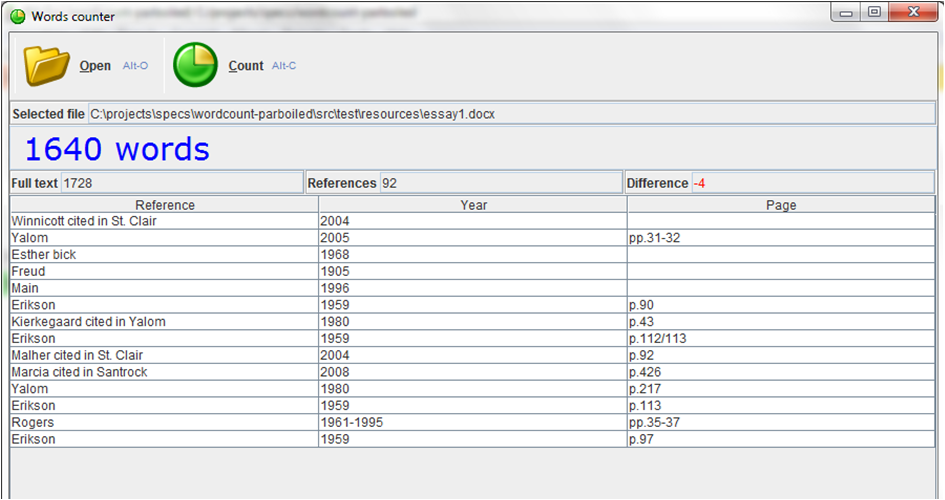
  • a results panel showing: the number of counted words and the document references

wordcount application
count example, note that the parsing is not perfect since the word counts do not add up!

If you have a look at the code you will see that this translates to:

  • an instance of SimpleSwingApplication defining a top method and including all the embedded components: a menu bar, a panel with the selected file and results
  • the subcomponents themselves: the menu items, the count action, the results panel
  • the "reactions" which is a PartialFunction listening to the events created by some components, SelectionChanged for example, and triggering the count or displaying the results

I was pretty happy to see that much of the verbosity of Swing programming is reduced with Scala:

  • you don't need to create xxxListeners for everything
  • there are components providing both a Panel and a LayoutManager with the appropriate syntax to display the components: FlowPanel, BoxPanel, BorderPanel
  • thanks to scala syntax you can write action = new Action(...) instead of setAction(new Action(...))

This is nice but I think that there is a some potential for pushing this way further and create more reusable out-of-the-box components. For example, I've created an OpenFileMenuItem which is a MenuItem with an Action to open a FileChooser. Also, something like a pervasive LabeledField with just a label and some text would very useful to have in a standard library.

I also added a bit of syntactic sugar to have actions executed on a worker thread, instead of the event dispatch thread (to avoid grey screens), using the SwingUtilities.invokeLater method. For example: myAction.inBackground will be executed on a separate thread.

Eventually, I was able to code up the GUI of the application pretty fast. The only thing which I didn't really like was the Publish/React pattern. It felt a bit messy. The next part of this series will show how Functional Reactive Programming with the reactive library helped me write cleaner code.

Reading the file

I anticipated this part to be a tad difficult. My first experiments of text parsing were using a simple text file and I knew that having the user (my wife, remember,...) copy and paste her text to another file just for counting would be a deal-breaker. So I tried to read .odt and .docx files directly. This was actually much easier than anything I expected!

Both formats are zipped xml files. Getting the content of those files is just a matter of:

  • reading the ZipFile entries and find the file containing the text

    val rootzip = new ZipFile(doc.path)
    rootzip.entries.find(_.getName.equals("word/document.xml"))
    
  • loading the xml as a NodeSeq

    XML.load(rootzip.getInputStream(f)))
    
  • find the nodes containing the actual text of the document and transform them to text

    // for a Word document text is under <p><t> tags
    (xml \\ "p") map (p => (p \\ "t").map(_.text) mkString "") mkString "\n"
    

For further details you can read the code here.

Recap

That's it, parser combinators + scala-swing + xml = a quick app solving a real-world problem. In the next posts we'll try to make this even better!